
Complete media hub for Apple enthusiasts
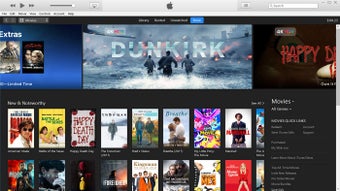
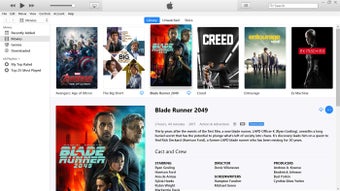
iTunes 64-bit is the program’s version required for 64-bit setups. This media app provides a way to enjoy music, movies, and TV shows while keeping them organized. Users can rent or buy movies, download favorite TV shows, and access other entertainment content through the program.
Top Recommended Alternative

Organized media and comprehensive content
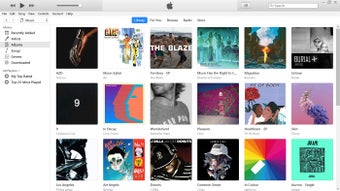
iTunes is designed to keep media organized. Users can add items to it and import music from CDs and DVDs into their library, so physical collections are consolidated. The program provides tools to manage the library and keep media in one place.
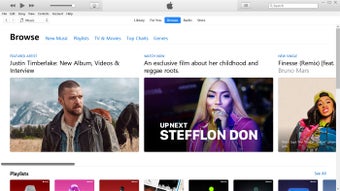
It is home to Apple Music, which offers millions of songs from classic hits to the newest releases. The service provides ad-free listening with zero commercials and the option to download favorite music for offline use. Users can stream music from Apple Music, get items from the iTunes Store, and try Apple Music free with no commitment, canceling anytime.
Access and playback across devices
With all songs plus Apple Music in the library, users can play favorites on all their devices. iTunes works with iCloud to help access the library across devices and can sync content to devices. Music can be played on speakers connected to the computer or any AirPlay-enabled device, such as the HomePod mini.
Hardware requirements
iTunes needs specific hardware. It requires a PC with a 1GHz Intel or AMD processor with support for SSE2 and 512MB of RAM. To play standard-definition video from the iTunes Store, an Intel Pentium D or faster processor, 512MB of RAM, and a DirectX 9.0–compatible video card is required.
To play 720p HD video, a 2.0GHz Intel Core 2 Duo or faster processor, 1GB of RAM, and an Intel GMA X3000, ATI Radeon X1300, or NVIDIA GeForce 6150 or better are required. To play 1080p HD video, a 2.4GHz Intel Core 2 Duo or faster processor, 2GB of RAM, and an Intel GMA X4500HD, ATI Radeon HD 2400, or NVIDIA GeForce 8300 GS or better are required.
A screen resolution of 1024×768 or greater is necessary, with 1280×800 or greater required to play an iTunes LP or iTunes Extras. A 16-bit sound card and speakers are required, and an internet connection is needed to use Apple Music, the iTunes Store, and iTunes Extras. An iTunes-compatible CD or DVD recorder is required to create audio CDs, MP3 CDs, or backup CDs or DVDs. However, songs from the Apple Music catalog cannot be burned to a CD.
Modern Apple app integration for Windows
Recent developments in Apple’s Windows ecosystem have expanded the role of iTunes 64-bit beyond just music playback and syncing. Apple now offers dedicated apps like Apple Music, Apple TV, and Apple Devices for Windows users, helping separate entertainment, streaming, and device management into more specialized experiences. Despite this shift, iTunes continues to receive updates and remains useful for managing podcasts, audiobooks, and legacy media libraries on compatible Windows systems.
Apple has also continued releasing maintenance updates for iTunes on Windows, including newer versions that improve compatibility with recent iPhone and iPad models while addressing stability concerns. These updates help ensure that users with older media libraries or established workflows can still rely on iTunes without completely migrating to newer Apple apps immediately.
Improved device management and media synchronization
One of the strongest aspects of iTunes 64-bit remains its ability to handle local media management and manual device syncing efficiently. Many long-time users still appreciate the program’s structured library organization, smart playlists, metadata editing, and offline media access. For users who maintain extensive MP3 collections or curated playlists, iTunes continues to offer a familiar and dependable management experience.
The program also continues to support iCloud syncing, AirPlay playback, and local backups for Apple devices. Combined with Apple’s broader ecosystem, users can move content between PCs, iPhones, iPads, and compatible speakers more smoothly while still maintaining control over locally stored files. This balance between cloud-based convenience and offline media ownership remains one of iTunes’ biggest strengths.
Enhanced streaming and entertainment features
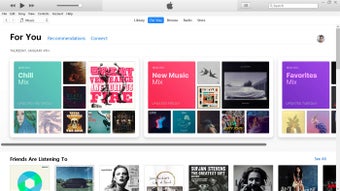
Apple’s entertainment services connected to iTunes have also evolved considerably. Through Apple Music integration, users can access millions of songs with offline playback support and curated recommendations. Apple has recently introduced additional music discovery tools, including AI-assisted playlist generation and concert discovery features tied to Apple Music services, enhancing the overall listening experience for subscribers.
Meanwhile, integration with Apple TV content, HD video playback, and multimedia libraries continues to make iTunes a versatile entertainment platform for Windows users. Whether managing personal music collections, purchasing movies, or syncing media across devices, the software still functions as a centralized hub for many Apple ecosystem users who prefer desktop-based media management.
A reliable choice
Although Apple is gradually transitioning users toward standalone Windows apps, iTunes 64-bit remains valuable for people who prefer a more traditional media management workflow. Its combination of library organization tools, offline playback, device syncing, CD importing, and cross-device support continues to make it practical for users with large personal collections and long-established Apple ecosystems.
For users who prioritize structured media management, manual syncing, and dependable access to purchased or imported content, iTunes still delivers a familiar and capable experience on Windows PCs. While newer Apple apps offer modern streaming-focused experiences, iTunes maintains its place as a reliable all-in-one media organizer for dedicated Apple enthusiasts.
The continuing value of iTunes 64-bit
iTunes 64-bit centralizes Apple Music, the iTunes Store, imported CDs, and device syncing in one program, combining streaming, downloads, purchases, and library management. It supports AirPlay and iCloud integration and requires compatible hardware and internet for full functionality. Note that Apple Music tracks cannot be burned to CD. It offers an organized way to enjoy and manage personal media easily.